


How do I activate SyPhone?
- You should have already received an activation code and phone number.
- Set up the phone’s Wi-Fi and connect to a Wi-Fi network.
- Enter the activation code and phone number you received.
- After activation, perform a Wi-Fi update immediately.
How do I enter a Wi-Fi password?
Go to Menu ➜ Wi-Fi Networks ➜ Select an available Wi-Fi network and enter your password using the numeric keypad.
Press a number key repeatedly to cycle through letters. For example, pressing “2” cycles through a-b-c-2. Use the “*” key to switch between uppercase and lowercase letters. Use the “#” key to enter symbols. Long-press “0” for 2 seconds to enter “+”.
 |
Make / Answer a call |  |
End call / Delete / Back |
 |
Confirm |  |
Outer ring: Up / Down / Left / Right navigation |
 |
Press number key repeatedly to enter letters: 2➜A➜B➜C➜2… |  |
Toggle uppercase / lowercase |
 |
Enter symbols |  |
Long press 2 seconds to enter “+”. |
How do I enter a space?
Press the “0” key repeatedly to cycle through “0” → “+” → “Space”. Pressing the “0” key a third time will insert a space.
How do I dial?
For local numbers, dial as you would on a regular phone. For international calls, add “+” before the number, followed by the country code and phone number. Long-press “0” for 2 seconds to enter “+”.
How do I make a conference call?
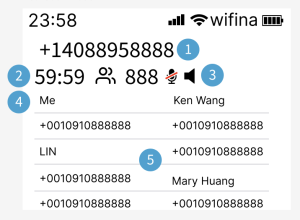
SyPhone supports conference calls, allowing you to hold a group call with two or more participants.
 |
|
There are two ways to join a conference call:
Method 1: Dial the designated number to join
- Call the designated number.
- After connecting, enter the designated passcode.
- You will then join the ongoing conference call.
Method 2: Invite others during an active call
If you are already in a conference call, you can invite others to join:
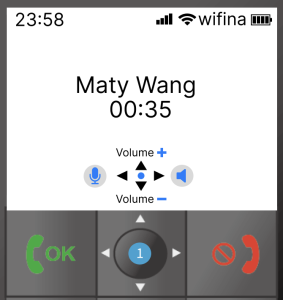
- Press the “Confirm” key during the call.
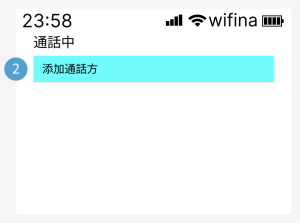
- Select “Add Participant”.
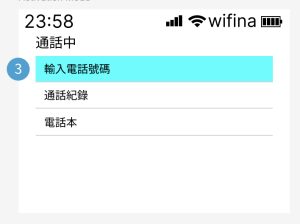
- Add participants by:
- Entering a phone number
- Selecting from “Call History”
- Selecting from the “Phonebook”
 |
 |
 |
|
How to Update Your SyPhone
SyPhone require a Wi-Fi connection to perform software updates. Before starting the update, please make sure your device is connected to a Wi-Fi network.
Steps:Menu➜Settings ➜ Wifi Update
During the update process, please do not perform any operations or turn off the device. Once the update is complete, the phone will automatically restart and return to the home screen.
How to Customize Your Caller ID
Once you set your Caller ID, the person you call will see your custom display name.
Steps:Menu ➜ Settings ➜ Caller ID➜Enter the name you’d like to display➜OK
How do I power off?
Hold the red end-call key for a few seconds to power off. Long-press again to power back on. You can also open the back cover and reconnect the battery.
How do I report a problem?
Please visit the “Contact Us” page and leave a message — someone will assist you shortly.